
Too few pixels
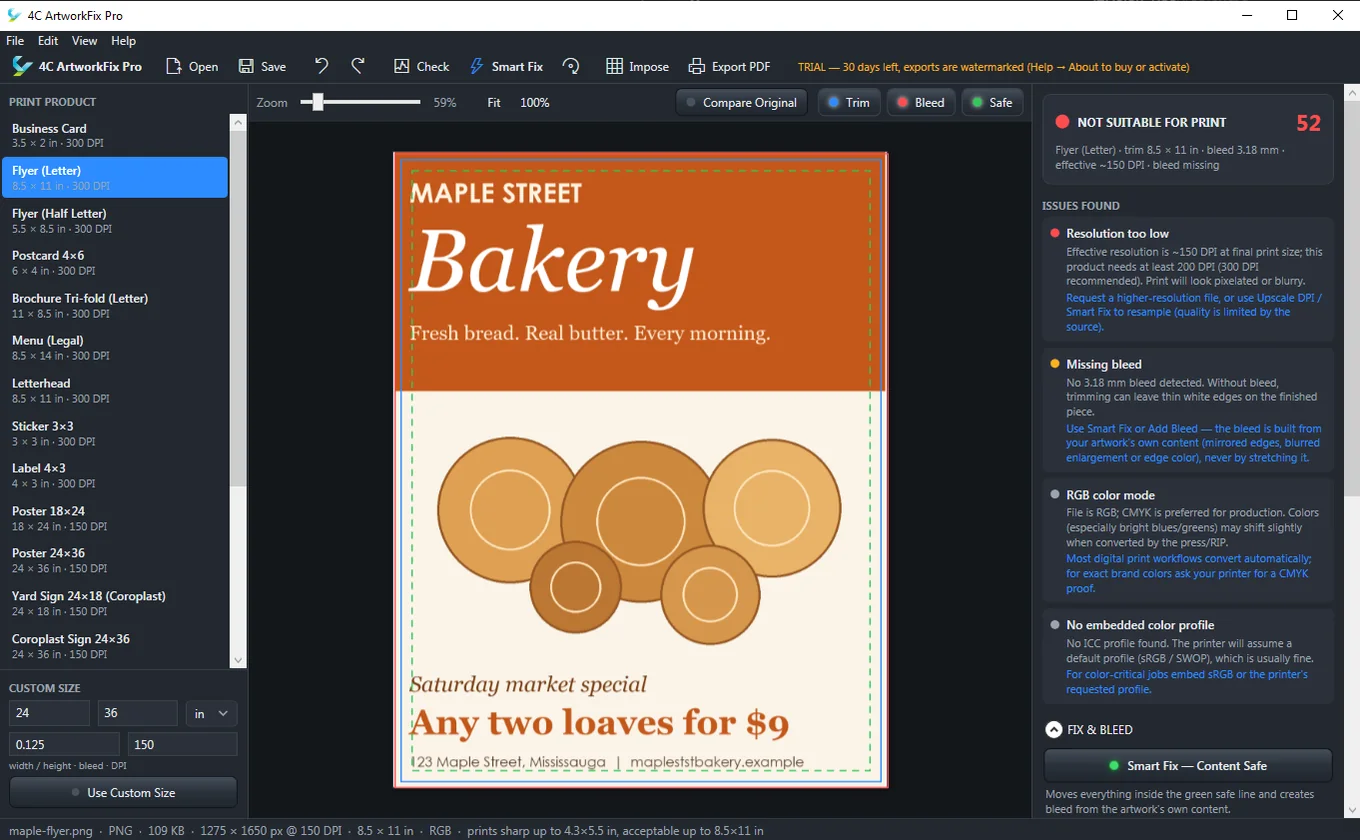
A logo pulled off a website prints soft and blocky. ArtworkFix Pro measures the real resolution at the final print size and tells you plainly whether it will hold up.
For print shops and sign makers · Windows
ArtworkFix Pro inspects every file your customers send, shows exactly what is wrong, and repairs it in one click: low resolution, missing bleed, content too close to the trim. Your originals are never changed.
The everyday problem
Every print shop knows the routine: open the file, squint, find the problem, email the customer, wait. ArtworkFix Pro does the squinting for you.
A logo pulled off a website prints soft and blocky. ArtworkFix Pro measures the real resolution at the final print size and tells you plainly whether it will hold up.
Without bleed, trimming leaves thin white edges. Smart Fix builds the bleed from the artwork's own content (mirrored edges, blurred enlargement or edge colour), never by stretching the picture.
Content outside the safe area gets cut off. Smart Fix moves everything inside the green safe line, so a phone number never lands on the guillotine.
What it does
One number from 0 to 100 and a short list of issues, each with a plain-English fix. Resolution, bleed, colour mode, missing colour profile and more.
Fit the content inside the safe area and build bleed from the artwork itself, in one step. Add bleed only, rotate, straighten, trim borders or upscale as needed.
Pick a product, from business cards and flyers to posters, yard signs and coroplast, or enter a custom size. Artwork rotates to match the product, which stays fixed.
Lay several copies on a sheet with step and repeat, see the sheet utilisation, and export the imposed PDF for the press.
Print-ready PDF with optional crop marks, a client proof PDF, or a flattened JPG, PNG or TIFF.
Compare against the original at any time, undo and redo, save projects to resume later, and use Simple mode when a customer sits at your counter.
How it works
Drag in a JPG, PNG, TIFF, PDF, AI, SVG or PSD. The check runs on its own.
Flyer, postcard, banner or sign. Or type a custom size, bleed and DPI.
See what is wrong and why it matters, then repair it. Toggle trim, bleed and safe guides to check the result.
Send a print-ready PDF to the press, or a proof to your customer.
Who it's for
Stop losing an hour a day to bad files. Give the counter team a tool that tells them what to fix.
Check large-format files at the real size and DPI before an expensive substrate is cut.
Preflight your own files before you send them to a printer, and avoid a reprint.
Pricing
Try everything free for 30 days. If it earns its place on your desk, buy a licence for that computer.
CA$99 + tax, once
Choose your location to see your exact total.
Your Machine ID:
Install the trial, open Help → About and copy it.
Secure payment by Square. Your licence key works on one computer. Questions? admin@4cdigital.com
Questions
Opening files, running checks and using Smart Fix keep working, but exporting is switched off until you buy and activate a licence. During the trial every export carries a watermark.
No. Checking, fixing, exporting and activating a licence all happen on your computer. Internet is only needed to buy, and to download the installer.
Never. Your originals stay exactly as they were. ArtworkFix Pro writes new files when you export.
A key works on the one computer it was made for. If you replace your computer or reinstall Windows, send us the new Machine ID and we will issue a replacement key.
The installer is not yet code-signed, so Windows SmartScreen may show a notice the first time. Choose "More info", then "Run anyway". You can check the file is the one we published by comparing its SHA-256 value, shown below the download button.
Windows 10 and Windows 11, 64-bit. You need about 600 MB of free disk space.
ArtworkFix Pro works on pictures. PDF, AI and SVG artwork is read at print resolution, so vector text and shapes become pixels, and exported PDFs contain a high-quality image, not live vector or PDF/X. Exports are RGB, with no spot colours. Only the first page of a multi-page file is opened, and EPS files are not supported (save them as PDF or TIFF first). If your work depends on those, check the trial against your own files before you buy.
Not at this time. ArtworkFix Pro is Windows software.
Try it on your own files
It takes about a minute to install. If you have questions first, write to us and a person will reply.